LapTimer 2.0



![Los Santos Overloaded Logistics [Legacy]](https://img.gta5-mods.com/q75-w500-h333-cfill/images/los-santos-overloaded-logistics/69f498-1777896900345.png "Los Santos Overloaded Logistics [Legacy]")





833
6
833
6
Lap Timer Script for Any Track
Description
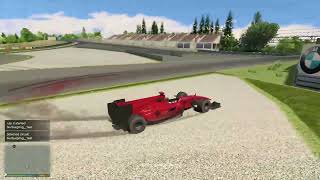
A lap timer script for GTA V that works on any track. Inspired by the broken Race Timer mod, this tool lets you time your laps, save telemetry, compare sector times, and more all with customizable tracks defined in a simple .ini file.
Features
- Lap & Sector Timing: Real-time lap and sector timing with on-screen notifications.
- Multi-Circuit Support: Define multiple circuits in timer.ini and switch between them dynamically in-game.
- Track Search System: Use Ctrl & B to search and switch tracks without exiting the game.
- Best Time Tracking: Records best lap and sector times per vehicle.
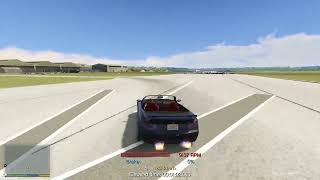
- Live Telemetry: Displays speed, RPM, gear, brake, fuel, steering, and wheel status.
- Customizable Output: Save lap times and telemetry to configurable text files.
- Visual Customization: Adjust telemetry colors and units (km/h or mph) via timer.ini.
- Lap Cancellation: Cancel the current lap with the N key.
- Python Analysis Tools: Includes chart.py and map3D.py for visualizing telemetry data.
Requirements
- Script Hook V
- Script Hook V .Net Enhanced
Installation
1. Extract timer.dll, timer.ini, of the language file into your scripts folder.
2. Edit timer.ini to configure:
- Paths: Where lap times and telemetry are saved.
- Settings: Telemetry visibility, units, tolerance, etc.
- Circuits: Add custom tracks using the format:
CircuitName = X,Y,Z/X,Y,Z/X,Y,Z
3. Save the file and launch GTA V.
Usage
- The timer starts automatically when you cross the first checkpoint (start/finish line).
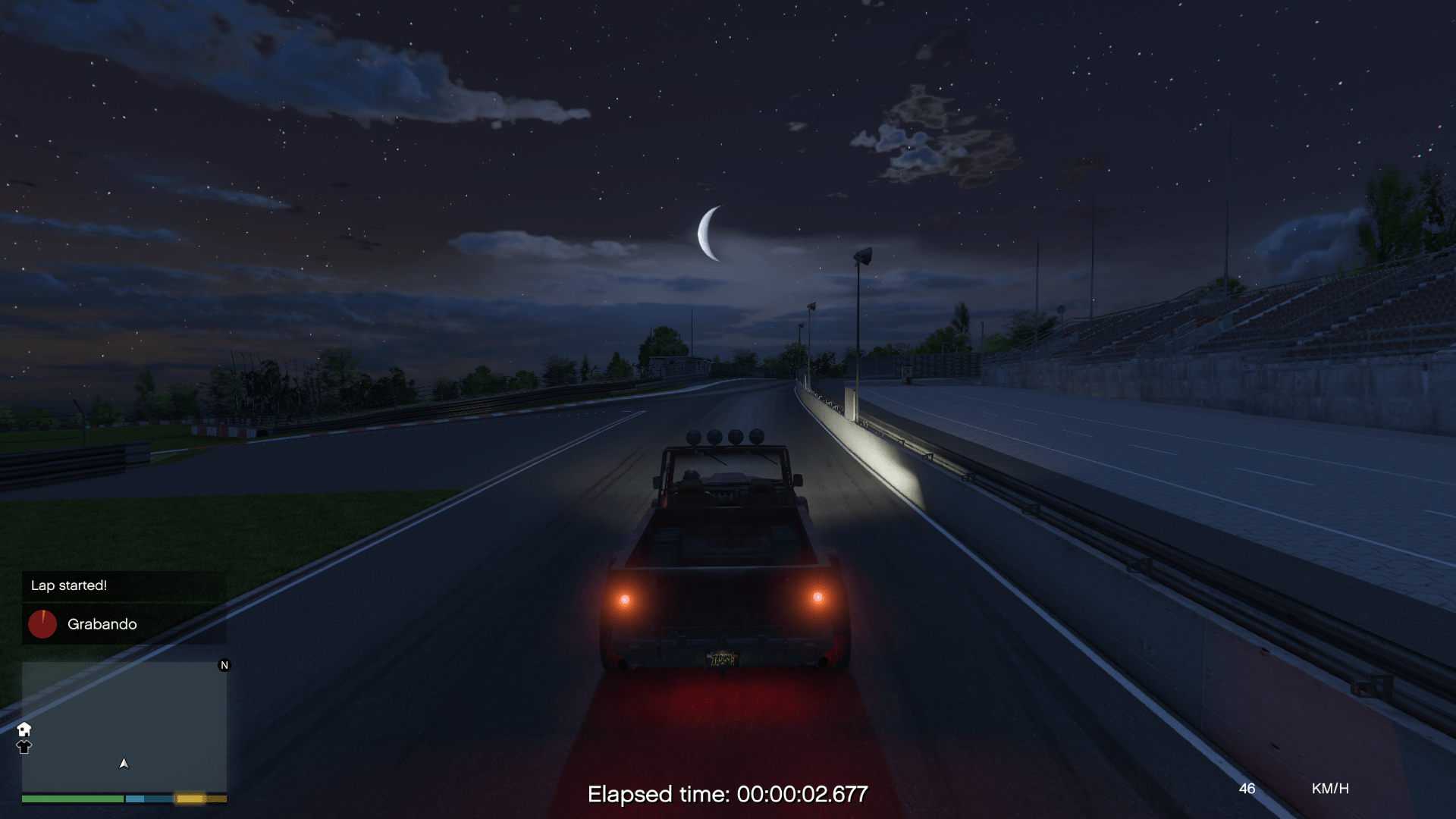
- On-screen notifications show lap start, sector times, deltas, and lap completion.
- The timer loops automatically. Press N to cancel a lap at any time.
- Use the in-game track search system (Ctrl & B) to switch circuits.
Track Search System
While in-game:
- Ctrl & B: Toggle search mode
- Up Arrow / 8: Move up in the results list
- Down Arrow / 2: Move down in the results list
- Enter: Select the highlighted track
- Backspace: Delete characters in the search bar
Included Tracks
Over 10 popular circuits are pre-configured, including:
- Nurburgring (Multiple Layouts)
- Le Mans Circuit
- Spa-Francorchamps 2025
- Monaco Grand Prix
- Barcelona-Catalunya
- Imola 2024
- Monza (Modern)
- Laguna Seca
- Top Gear UK Test Track
- Mount Panorama (Bathurst)
- Fujimi Kaido
Python Telemetry Tools
Two Python scripts are included for advanced telemetry analysis:
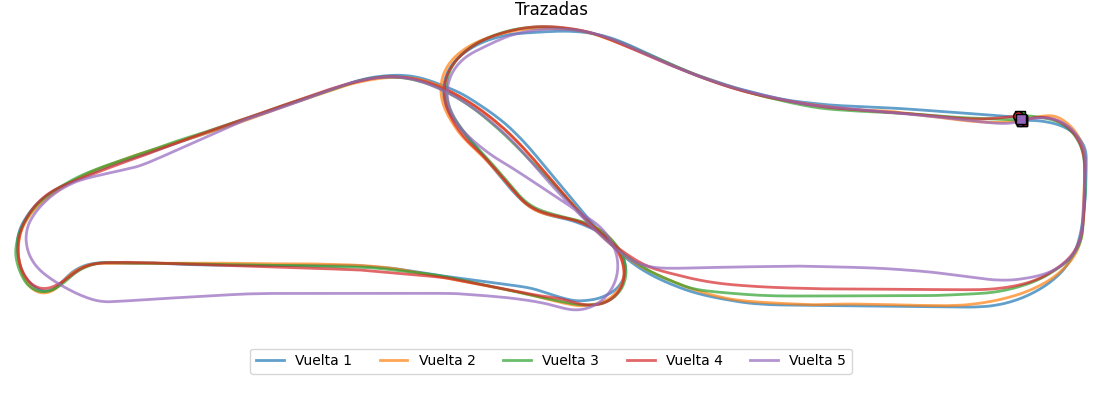
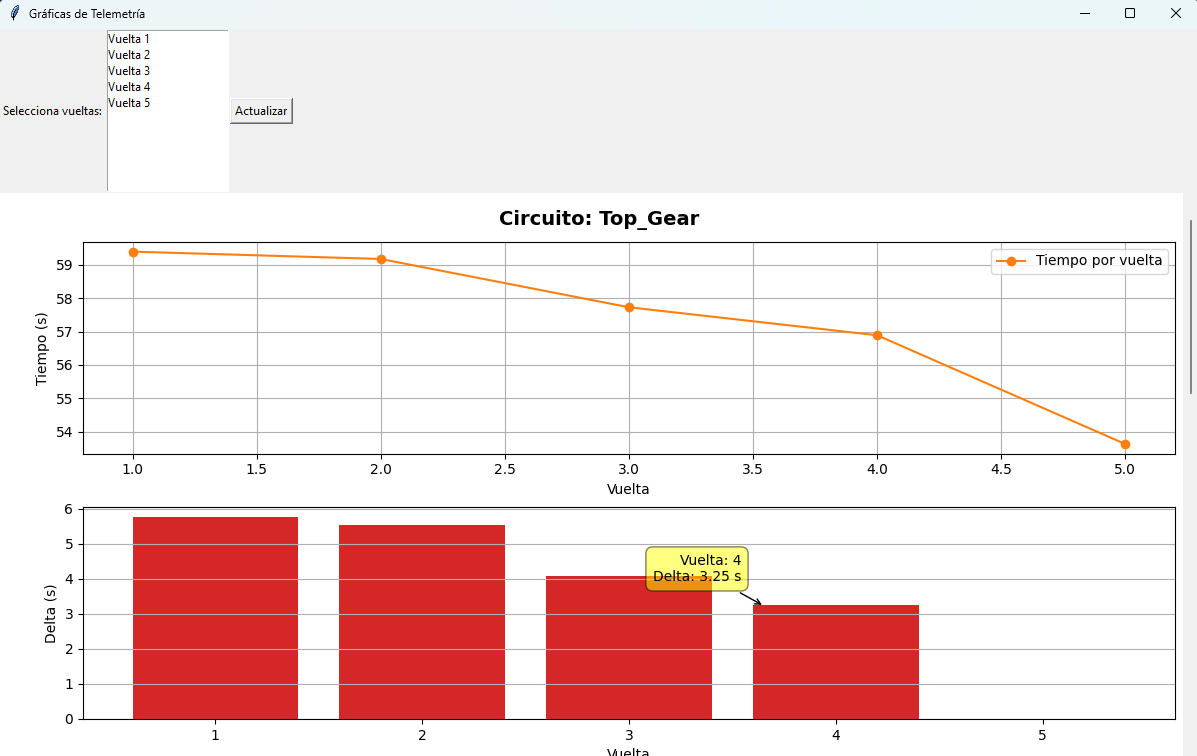
- grafica.py: Graphs speed, braking, RPM, and gear usage over time.
- mapa3D.py: Generates a 3D visualization of your route using recorded coordinates.
Both read from telemetrygta5.log and require:
matplotlib, numpy, tkinter
Tips
- Press N to cancel a lap.
- Use Ctrl & B to search and switch tracks without leaving the game.
- Lap times are also logged in Pause Menu > Brief > Notifications.
- Keep SaveTelemetry off in timer.ini to avoid large telemetry files.
- Works great with Ghost Replay for lap telemetry.
Changelog
- v2.0 (30/12/2025): Added track search system and more charts in telemetry.
- v1.2 (24/05/2025): Added Python telemetry visualization scripts.
- v1.1 (25/02/2025): Added telemetry color options, coordinate validation, Bathurst circuit.
- v1.0 (24/02/2025): Multi-circuit support, sector timing, telemetry saving, INI track creation.
- v0.2 (22/02/2025): Initial compiled version (locked to Nurburgring).
More information in README.md files.
Development
The project is open-source and hosted on GitHub for customization, learning, or feedback:
https://github.com/Antthony12/Timer
Credits
Special thanks to JohnFromGWN for helping fix deprecated code and getting the script to compile.
License
This project is licensed under the MIT License. See LICENSE.txt for details.
Description
A lap timer script for GTA V that works on any track. Inspired by the broken Race Timer mod, this tool lets you time your laps, save telemetry, compare sector times, and more all with customizable tracks defined in a simple .ini file.
Features
- Lap & Sector Timing: Real-time lap and sector timing with on-screen notifications.
- Multi-Circuit Support: Define multiple circuits in timer.ini and switch between them dynamically in-game.
- Track Search System: Use Ctrl & B to search and switch tracks without exiting the game.
- Best Time Tracking: Records best lap and sector times per vehicle.
- Live Telemetry: Displays speed, RPM, gear, brake, fuel, steering, and wheel status.
- Customizable Output: Save lap times and telemetry to configurable text files.
- Visual Customization: Adjust telemetry colors and units (km/h or mph) via timer.ini.
- Lap Cancellation: Cancel the current lap with the N key.
- Python Analysis Tools: Includes chart.py and map3D.py for visualizing telemetry data.
Requirements
- Script Hook V
- Script Hook V .Net Enhanced
Installation
1. Extract timer.dll, timer.ini, of the language file into your scripts folder.
2. Edit timer.ini to configure:
- Paths: Where lap times and telemetry are saved.
- Settings: Telemetry visibility, units, tolerance, etc.
- Circuits: Add custom tracks using the format:
CircuitName = X,Y,Z/X,Y,Z/X,Y,Z
3. Save the file and launch GTA V.
Usage
- The timer starts automatically when you cross the first checkpoint (start/finish line).
- On-screen notifications show lap start, sector times, deltas, and lap completion.
- The timer loops automatically. Press N to cancel a lap at any time.
- Use the in-game track search system (Ctrl & B) to switch circuits.
Track Search System
While in-game:
- Ctrl & B: Toggle search mode
- Up Arrow / 8: Move up in the results list
- Down Arrow / 2: Move down in the results list
- Enter: Select the highlighted track
- Backspace: Delete characters in the search bar
Included Tracks
Over 10 popular circuits are pre-configured, including:
- Nurburgring (Multiple Layouts)
- Le Mans Circuit
- Spa-Francorchamps 2025
- Monaco Grand Prix
- Barcelona-Catalunya
- Imola 2024
- Monza (Modern)
- Laguna Seca
- Top Gear UK Test Track
- Mount Panorama (Bathurst)
- Fujimi Kaido
Python Telemetry Tools
Two Python scripts are included for advanced telemetry analysis:
- grafica.py: Graphs speed, braking, RPM, and gear usage over time.
- mapa3D.py: Generates a 3D visualization of your route using recorded coordinates.
Both read from telemetrygta5.log and require:
matplotlib, numpy, tkinter
Tips
- Press N to cancel a lap.
- Use Ctrl & B to search and switch tracks without leaving the game.
- Lap times are also logged in Pause Menu > Brief > Notifications.
- Keep SaveTelemetry off in timer.ini to avoid large telemetry files.
- Works great with Ghost Replay for lap telemetry.
Changelog
- v2.0 (30/12/2025): Added track search system and more charts in telemetry.
- v1.2 (24/05/2025): Added Python telemetry visualization scripts.
- v1.1 (25/02/2025): Added telemetry color options, coordinate validation, Bathurst circuit.
- v1.0 (24/02/2025): Multi-circuit support, sector timing, telemetry saving, INI track creation.
- v0.2 (22/02/2025): Initial compiled version (locked to Nurburgring).
More information in README.md files.
Development
The project is open-source and hosted on GitHub for customization, learning, or feedback:
https://github.com/Antthony12/Timer
Credits
Special thanks to JohnFromGWN for helping fix deprecated code and getting the script to compile.
License
This project is licensed under the MIT License. See LICENSE.txt for details.
Первая загрузка: 20 февраля 2025
Последнее обновление: 31 декабря 2025
Последнее скачивание: 4 дня назад
15 комментариев
More mods by Antthony_12:
Lap Timer Script for Any Track
Description
A lap timer script for GTA V that works on any track. Inspired by the broken Race Timer mod, this tool lets you time your laps, save telemetry, compare sector times, and more all with customizable tracks defined in a simple .ini file.
Features
- Lap & Sector Timing: Real-time lap and sector timing with on-screen notifications.
- Multi-Circuit Support: Define multiple circuits in timer.ini and switch between them dynamically in-game.
- Track Search System: Use Ctrl & B to search and switch tracks without exiting the game.
- Best Time Tracking: Records best lap and sector times per vehicle.
- Live Telemetry: Displays speed, RPM, gear, brake, fuel, steering, and wheel status.
- Customizable Output: Save lap times and telemetry to configurable text files.
- Visual Customization: Adjust telemetry colors and units (km/h or mph) via timer.ini.
- Lap Cancellation: Cancel the current lap with the N key.
- Python Analysis Tools: Includes chart.py and map3D.py for visualizing telemetry data.
Requirements
- Script Hook V
- Script Hook V .Net Enhanced
Installation
1. Extract timer.dll, timer.ini, of the language file into your scripts folder.
2. Edit timer.ini to configure:
- Paths: Where lap times and telemetry are saved.
- Settings: Telemetry visibility, units, tolerance, etc.
- Circuits: Add custom tracks using the format:
CircuitName = X,Y,Z/X,Y,Z/X,Y,Z
3. Save the file and launch GTA V.
Usage
- The timer starts automatically when you cross the first checkpoint (start/finish line).
- On-screen notifications show lap start, sector times, deltas, and lap completion.
- The timer loops automatically. Press N to cancel a lap at any time.
- Use the in-game track search system (Ctrl & B) to switch circuits.
Track Search System
While in-game:
- Ctrl & B: Toggle search mode
- Up Arrow / 8: Move up in the results list
- Down Arrow / 2: Move down in the results list
- Enter: Select the highlighted track
- Backspace: Delete characters in the search bar
Included Tracks
Over 10 popular circuits are pre-configured, including:
- Nurburgring (Multiple Layouts)
- Le Mans Circuit
- Spa-Francorchamps 2025
- Monaco Grand Prix
- Barcelona-Catalunya
- Imola 2024
- Monza (Modern)
- Laguna Seca
- Top Gear UK Test Track
- Mount Panorama (Bathurst)
- Fujimi Kaido
Python Telemetry Tools
Two Python scripts are included for advanced telemetry analysis:
- grafica.py: Graphs speed, braking, RPM, and gear usage over time.
- mapa3D.py: Generates a 3D visualization of your route using recorded coordinates.
Both read from telemetrygta5.log and require:
matplotlib, numpy, tkinter
Tips
- Press N to cancel a lap.
- Use Ctrl & B to search and switch tracks without leaving the game.
- Lap times are also logged in Pause Menu > Brief > Notifications.
- Keep SaveTelemetry off in timer.ini to avoid large telemetry files.
- Works great with Ghost Replay for lap telemetry.
Changelog
- v2.0 (30/12/2025): Added track search system and more charts in telemetry.
- v1.2 (24/05/2025): Added Python telemetry visualization scripts.
- v1.1 (25/02/2025): Added telemetry color options, coordinate validation, Bathurst circuit.
- v1.0 (24/02/2025): Multi-circuit support, sector timing, telemetry saving, INI track creation.
- v0.2 (22/02/2025): Initial compiled version (locked to Nurburgring).
More information in README.md files.
Development
The project is open-source and hosted on GitHub for customization, learning, or feedback:
https://github.com/Antthony12/Timer
Credits
Special thanks to JohnFromGWN for helping fix deprecated code and getting the script to compile.
License
This project is licensed under the MIT License. See LICENSE.txt for details.
Description
A lap timer script for GTA V that works on any track. Inspired by the broken Race Timer mod, this tool lets you time your laps, save telemetry, compare sector times, and more all with customizable tracks defined in a simple .ini file.
Features
- Lap & Sector Timing: Real-time lap and sector timing with on-screen notifications.
- Multi-Circuit Support: Define multiple circuits in timer.ini and switch between them dynamically in-game.
- Track Search System: Use Ctrl & B to search and switch tracks without exiting the game.
- Best Time Tracking: Records best lap and sector times per vehicle.
- Live Telemetry: Displays speed, RPM, gear, brake, fuel, steering, and wheel status.
- Customizable Output: Save lap times and telemetry to configurable text files.
- Visual Customization: Adjust telemetry colors and units (km/h or mph) via timer.ini.
- Lap Cancellation: Cancel the current lap with the N key.
- Python Analysis Tools: Includes chart.py and map3D.py for visualizing telemetry data.
Requirements
- Script Hook V
- Script Hook V .Net Enhanced
Installation
1. Extract timer.dll, timer.ini, of the language file into your scripts folder.
2. Edit timer.ini to configure:
- Paths: Where lap times and telemetry are saved.
- Settings: Telemetry visibility, units, tolerance, etc.
- Circuits: Add custom tracks using the format:
CircuitName = X,Y,Z/X,Y,Z/X,Y,Z
3. Save the file and launch GTA V.
Usage
- The timer starts automatically when you cross the first checkpoint (start/finish line).
- On-screen notifications show lap start, sector times, deltas, and lap completion.
- The timer loops automatically. Press N to cancel a lap at any time.
- Use the in-game track search system (Ctrl & B) to switch circuits.
Track Search System
While in-game:
- Ctrl & B: Toggle search mode
- Up Arrow / 8: Move up in the results list
- Down Arrow / 2: Move down in the results list
- Enter: Select the highlighted track
- Backspace: Delete characters in the search bar
Included Tracks
Over 10 popular circuits are pre-configured, including:
- Nurburgring (Multiple Layouts)
- Le Mans Circuit
- Spa-Francorchamps 2025
- Monaco Grand Prix
- Barcelona-Catalunya
- Imola 2024
- Monza (Modern)
- Laguna Seca
- Top Gear UK Test Track
- Mount Panorama (Bathurst)
- Fujimi Kaido
Python Telemetry Tools
Two Python scripts are included for advanced telemetry analysis:
- grafica.py: Graphs speed, braking, RPM, and gear usage over time.
- mapa3D.py: Generates a 3D visualization of your route using recorded coordinates.
Both read from telemetrygta5.log and require:
matplotlib, numpy, tkinter
Tips
- Press N to cancel a lap.
- Use Ctrl & B to search and switch tracks without leaving the game.
- Lap times are also logged in Pause Menu > Brief > Notifications.
- Keep SaveTelemetry off in timer.ini to avoid large telemetry files.
- Works great with Ghost Replay for lap telemetry.
Changelog
- v2.0 (30/12/2025): Added track search system and more charts in telemetry.
- v1.2 (24/05/2025): Added Python telemetry visualization scripts.
- v1.1 (25/02/2025): Added telemetry color options, coordinate validation, Bathurst circuit.
- v1.0 (24/02/2025): Multi-circuit support, sector timing, telemetry saving, INI track creation.
- v0.2 (22/02/2025): Initial compiled version (locked to Nurburgring).
More information in README.md files.
Development
The project is open-source and hosted on GitHub for customization, learning, or feedback:
https://github.com/Antthony12/Timer
Credits
Special thanks to JohnFromGWN for helping fix deprecated code and getting the script to compile.
License
This project is licensed under the MIT License. See LICENSE.txt for details.
Первая загрузка: 20 февраля 2025
Последнее обновление: 31 декабря 2025
Последнее скачивание: 4 дня назад
 5mods on Discord

@Antthony_12
You stated you couldn't compile this script? I'm assuming you're using an old script or tutorial, or more likely AI. If the latter please be aware that the chat AI models (ChatGPT or other) didn't have the best learning resources for SHVDN and consequently Chat AI often invents its own methods and properties. I'm a big fan of AI, as in Stable Diffusion, but it is not the best way to script GTA V.
Since your script is not compiled - the code is exposed- i'm assuming it's both proper and ethical to review it. Most importantly, I hope you don't mind these suggestions and the reason your code isn't compiling yet still working:
You should be using the latest version of SHVDN if you're uploading mods.
For your directives you have choices:
using GTA.UI; //For notification and Subtitles
using Screen = GTA.UI.Screen; //For Subtitles
For notifications, depending on your directives:
Notification.PostTicker("Lap started!",true); //was Notification.Show
For ShowSubtitle, depending on your directives:
GTA.UI.Screen.ShowSubtitle("Elapsed time: " + formattedTime);
or
Screen.ShowSubtitle("Elapsed time: " + formattedTime); // based on your directives
@JohnFromGWN Thanks for your suggestions, I'm not going to bother you if you want to help me, in fact, I appreciate all help since I've never programmed in C# and even less for GTA 5. You caught me, the script was made by chatGTP ^^'.
Thanks to the code you've posted, it seems that it now runs with ScriptHookVDotNet3 and not 2 and that makes the warning that version 2 is deprecated not appear.
I'm using the latest version of SHVDN Nightly.
Regarding compiling it, I've managed to do it with net9.0.200 but SHVDN returns:
[17:08:22] [DEBUG] Loading assembly timer.dll ...
[17:08:22] [ERROR] Failed to load script assembly timer.dll when searching for script types because there is an assembly that the script tried to load as a dependency but couldn't. Exception message: One or more required types cannot be loaded. Retrieve the LoaderExceptions property for more information.
First LoaderException message (which tells what assembly is missing): System.IO.FileNotFoundException: Cannot load file or assembly 'System.Runtime, Version=9.0.0.0, Culture=neutral, PublicKeyToken=b03f5f7f11d50a3a' or one of its dependencies. The system cannot find the file specified.
File name: 'System.Runtime, Version=9.0.0.0, Culture=neutral, PublicKeyToken=b03f5f7f11d50a3a'
Compiling it with net8.0 directly SHVDN ignores the script. So here I am stuck again.
@Antthony_12 There is nothing wrong with using Chat AI. However there are caveats. The learning models use whatever code they can find and most of it is outdated. As a result, the code it generates often is also outdated and the worst of it is that it will invent properties and methods. I haven't compiled your code and I really don't understand why SHVDN would generate such errors. I just spotted your errors in the text. I also use a timer, when I test for stability, and have never encountered such errors. When I have a chance, I'll compile your code and report back.
Finally, in passing, not all code will run uncompiled (for example LemonUI) and if you do use uncompiled scripts the convention is to use .3.cs, for example myscript.3.cs when using SHVDN3.
@Antthony_12 P.S. Are you using VS to compile? Either way, compile with .NET Framework 4.8
@JohnFromGWN Thank you very much, I will keep trying.
@Antthony_12 I can't reproduce your errors. I mean from the log it's very clear that your compiler can't find the necessary assemblies/references. Without knowing what IDE and/or C# compiler you're using I can't comment further. If you do use VS and I strongly recommend it, you will need to add the reference, whether they be System or mod libraries such as SHVDN, nativeui, lemonui, ifruit...etc.
@JohnFromGWN Yes, I'm using VS code and Net9.0, tomorrow I'll try .Net Framework 4.8.1 for devs. The libraries I use are SHVDN and System.windows.forms.dll (from net9.0) I haven't put anything else in the .csproj file, then a dotnet build and it compiles with a warning about the keys
Update: I managed to compile it thanks to a youtube tutorial 🥳🥳. Thanks again JohnFromGWN for helping out.
This is in case anyone is interested
https://www.youtube.com/watch?v=OZ_SUy0AXL4
@Antthony_12 Glad you fixed it. The "keys error" is likely due to System.Windows.Forms which needs to be added as a reference in VS for your key events. Don't understand why the video you watched took 20 minutes. Essentially, once VS is installed, you need a Class Library (.NET Framework) template and select 4.8 as your framework. That's it.
In passing, you can tell when a YouTuber is a noob when they don't recognize that the V and similar letters in the GTA franchise are actually Roman numerals. That's why you'll hear them pronounce Scripthook Vee instead of Five, Open Eye Vee instead of Open 4 etc. Funny how they recognize it's GTA 4 and GTA 5, not GTA Eye Vee and GTA Vee.
I found your conversation through a Google Search lol. Thank you @JohnFromGWN for giving the proper info I was looking for as the Notification.Show was deprecated and for some reason, I could not wrap my head around the suggestion that VS was suggesting.
Anyways, I won't flood the comments about my own personal stuff. Thanks both to John and Anthony, I got more out of your comments than I did off of searches on Google lol
@Benzo Effect Glad to help. Cheers
Ctrl + B doesn't seem to work at the moment. Is there something wrong with the versions of Scripthook/mod/game that may be affecting compatibility or is there a crucial thing I'm missing?
@bphap The last time I tried it it worked fine. This weekend I will review it. And I think I have a pending version to upload. Sorry for not having seen your comment before
@bphap Hi again, I just tested it and everything works fine. Could you please share what's in the ScriptHookVDotNet.log file?